Hit Your Target ACoS on Autopilot – BidBison Engine
Target ACoS Automation

Amazon PPC AI Software That Holds Your Target ACoS

Target ACoS automation means you state the Advertising Cost of Sale you want, and bids move to hold it - without the daily up-down cycle of manual bid management.

The problem with manual bidding

Manual ACoS management is a loop you can't win.

Raise a bid, it overshoots. Cut it back, sales drop. Multiply that across hundreds of keywords and manual ACoS management becomes a full-time job that never actually finishes.

  • Anti-oscillation bid control - keeps bids inside a sensible band instead of bouncing them daily.
  • New-to-brand keyword protection - keeps valuable Brand keywords alive when last-click math undervalues them.
  • Works inside your goal - Maintain ACoS, Reduce ACoS and Scale winners all optimize around the same target differently.

Target ACoS · bid band

holding at 22%
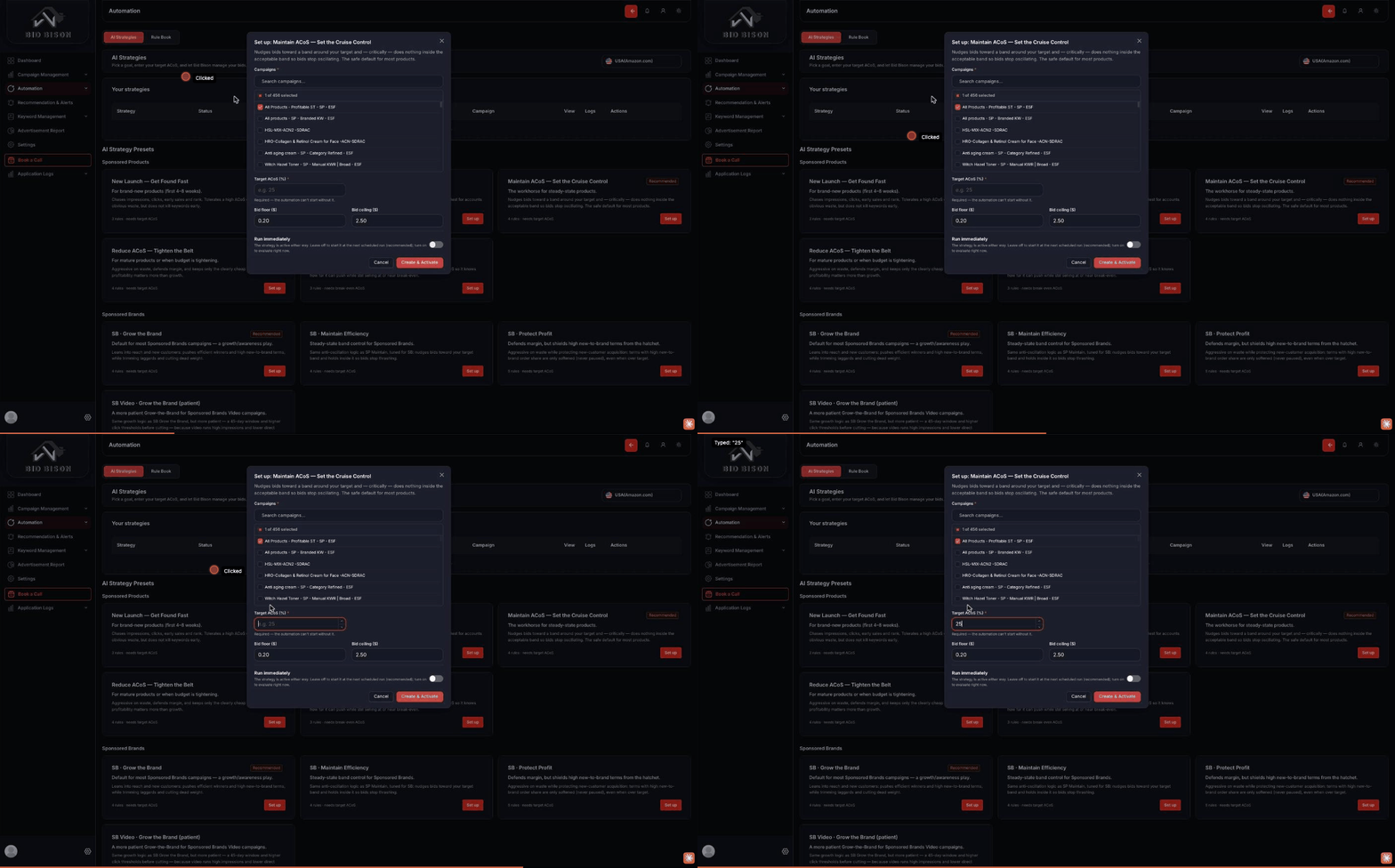
Target ACoS strategy setup with bid floor, bid ceiling and campaign selection
How it works

Three steps, then it runs itself.

1

Connect your Amazon Advertising account

BidBison reads live performance data for every campaign, keyword and placement.

2

Set a target ACoS

State the number you want to hold. The engine treats it as the goalpost for every bid decision.

3

The engine holds the band

Bids move up and down inside sensible limits, correcting drift without whiplashing on daily noise.

In detail

How the target ACoS engine actually moves your bids.

What a target ACoS actually instructs

Setting a target ACoS is not a cap. It is the ratio the engine steers toward across a campaign group over a rolling window, which means individual keywords are deliberately allowed to sit above and below it. A keyword converting at 8% with a high average order value can carry a 40% ACoS and still be your most profitable target; a keyword at 1% conversion can be unprofitable at 15%. Averaging to the target is the job — clamping every keyword to it is how accounts lose their best traffic.

Anti-oscillation bid control, with numbers

The common failure of rule-based bidding is a weekly sawtooth: a rule sees a 45% ACoS and cuts the bid 20%, impressions fall, the next run sees a 12% ACoS on thin data and raises it 20%, and the keyword never holds a position long enough to gather a reliable signal. Two months of that produces volatility, not learning.

BidBison holds each bid inside a band around its recent effective value and limits how far it can travel per adjustment. A keyword whose bid sits at $1.20 moves in single-digit-percentage steps — to $1.28, then $1.34 — rather than jumping to $1.60 and back. When conversion data is thin, the step size shrinks rather than the direction reversing. The practical effect is that placement stays stable long enough for the data to mean something, and your average CPC stops paying the cost of your own indecision.

What happens in the first three weeks

  • Days 1-3: the engine reads existing history and makes small corrective moves. Nothing dramatic — this is deliberate.
  • Days 4-14: bids converge toward the level each target can sustain. Spend often shifts between keywords more than it changes in total.
  • Days 15-21: attribution catches up and the ACoS trend becomes readable. This is the first point at which judging the target is fair.

Reading results before day 14 is the most common mistake, because Amazon attributes sales for up to 14 days after a click. Early in a change, spend is fully counted while sales are not.

Choosing a target you can hold

Start from break-even ACoS, which equals your gross margin before ad costs. For an established product, a target 8-15 points under break-even usually leaves real profit while keeping volume. For a launch, a target at or above break-even is a rational, time-boxed purchase of rank — as long as the spend is capped and the date it ends is written down. Our ACoS calculator gives you the break-even figure in a few seconds.

If the target you want is far below where the account currently runs, move it in stages rather than in one jump. A 34% to 22% change asked for at once forces the engine to bid down broadly; asked for over three weeks, it lets the unprofitable targets fall away while the profitable ones keep their placement.

Where automation should not decide alone

Automation handles bid arithmetic well. It cannot know that a product is going out of stock in ten days, that a competitor's price cut just changed your conversion rate, or that a new variant is about to launch. Those are the moments to set a manual value or pause automation on a campaign — both are respected, and neither is overwritten.

Last reviewed 1 September 2026 by the eStore Factory advertising team.

Questions

Target ACoS, answered.

What is target ACoS automation?
Target ACoS automation adjusts your Amazon Sponsored Ads bids toward a specific Advertising Cost of Sale you set, instead of you calculating and changing bids by hand.
How does BidBison avoid overcorrecting bids?
BidBison uses anti-oscillation bid control, which keeps bids inside a sensible band instead of swinging them up and down every day in response to short-term noise.
What if my ACoS target is unrealistic for a keyword?
The engine optimizes toward your target within the bounds of what a keyword can realistically deliver - it will not force spend that consistently produces no return.
Is target ACoS a hard cap on spend?
No. It is the ratio the engine steers a campaign group toward over a rolling window. Individual keywords sit above and below it on purpose, because a high-converting keyword can be profitable well above the target.
How long until I see the target being held?
Expect bid activity within 24 hours and a readable ACoS trend at two to three weeks, once Amazon's 14-day attribution window has settled. Judging it earlier counts full spend against incomplete sales.
What if my target is unrealistic for the account?
The engine will bid toward it and you will see volume fall rather than the target being met. That is useful information: it usually means conversion rate or search-term quality is the real constraint, not the bids.
Can I set different targets for different products?
Yes. Targets apply per campaign group, so a launch can run above break-even while the core catalogue runs well below it.
Does it bid on Sponsored Brands and Display too?
Yes — Sponsored Products, Brands, Display and Sponsored TV. On Brand campaigns, new-to-brand keyword protection prevents last-click maths from cutting terms that build your customer base.

Set your target ACoS today.

14-day free trial, credit card required. Connect your account and pick a goal in minutes.