Sponsored Products vs Sponsored Brands vs Sponsored Display: Which Should Get Your Budget?
Amazon gives you three main ad types, and each one works differently. Here is a practical framework for splitting your budget so your money goes where it works hardest.
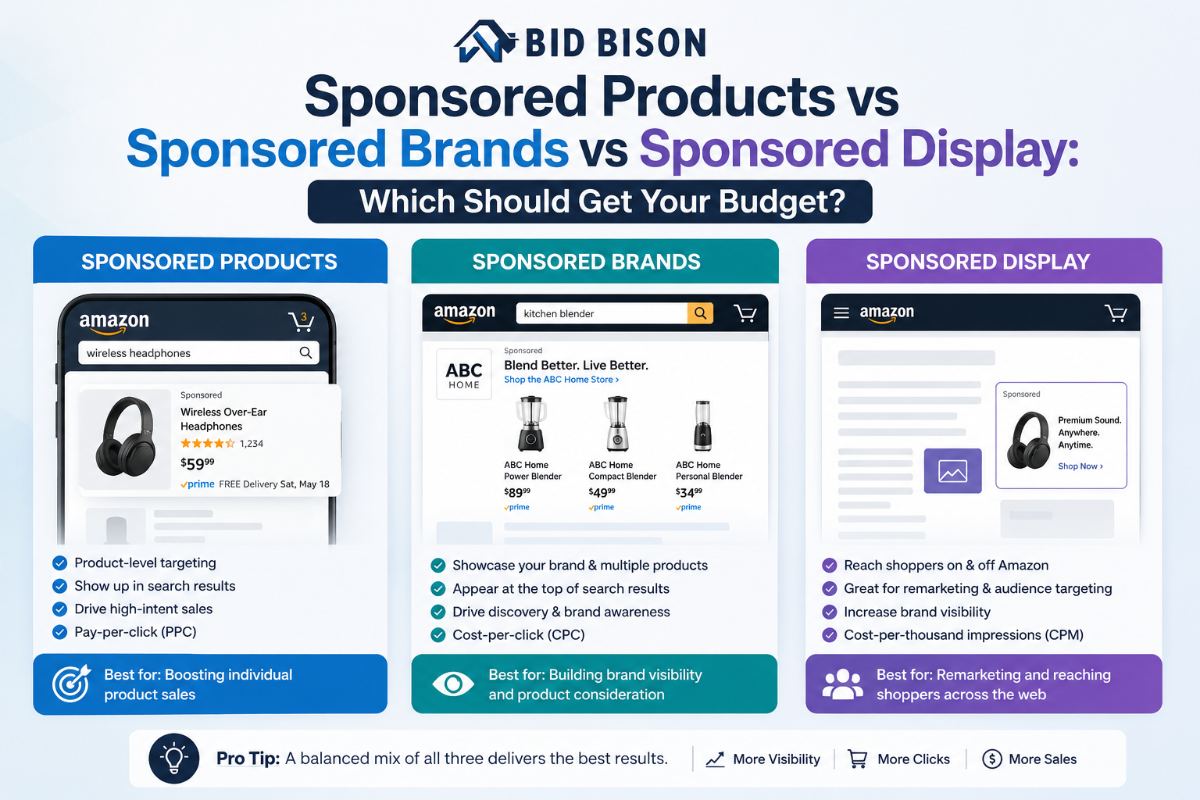
If you sell on Amazon, you have probably asked yourself this question at least once: "I have a fixed ad budget, so where should I actually spend it?" Amazon gives you three main ad types — Sponsored Products, Sponsored Brands, and Sponsored Display — and each one works in a different way. Without a clear system, most sellers just split the budget randomly or copy what a YouTube video told them to do.
This guide breaks down what each ad type actually does, when to use it, and how to divide your budget between them so your money goes where it works hardest. By the end, you will have a simple, practical framework — the kind you can use starting today, whether you are a new seller or someone managing a growing catalog.
Quick overview: what each ad type actually does
Before we get into budget splits, let's understand the basics in plain language.
Sponsored Products are the ads you see mixed inside search results or on product pages. They look almost like normal listings, and they are the most direct way to get a sale. Someone searches for "yoga mat," your ad shows up alongside the mat, and if it looks good, they click and buy.
Sponsored Brands are the ads you see at the top of search results, usually showing your logo along with three or four of your products in a row. These ads exist to build brand recognition, not just push one sale. They tell shoppers "this seller has a full range, not just one product."
Sponsored Display ads work differently. They can show up on Amazon product pages, and even off Amazon, on other websites and apps. Their biggest strength is retargeting — showing your ad again to someone who viewed your product but did not buy, or targeting people who viewed a competitor's listing.
Think of it this way: Sponsored Products get the sale, Sponsored Brands build the name, and Sponsored Display brings people back.
Sponsored Products: when and why to use them
Sponsored Products should usually get the largest share of your budget, especially in the early stage of any product's life. Here is why.
Best for: New product launches, driving direct sales, and products that already convert well organically.
Why it works: These ads target high-intent shoppers — people who are already searching with buying intent. If someone types "stainless steel water bottle 1 litre," they are close to making a purchase decision. Your ad just needs to be relevant enough to catch that click.
Budget tip: If your main goal right now is sales volume or getting a new listing off the ground, put 60–70% of your ad budget here. This ad type gives you the fastest, most measurable return, which makes it the safest place to start.
The tricky part is that Sponsored Products campaigns need constant attention. Bids that worked last week might be too high or too low this week, depending on competition, seasonality, and your own account health. This is exactly the kind of ongoing adjustment that eats up a seller's time.
Sponsored Brands: when and why to use them
Once a product (or a full catalog) has some sales history, Sponsored Brands starts making more sense.
Best for: Sellers with multiple products under one brand, and anyone trying to build long-term recognition, not just one-time sales.
Why it works: These ads sit at the top of the page, which means better visibility. Because they show several products together, they often lead to a higher average order value — a shopper might come for one product and add two more to the cart because they now trust the brand.
Budget tip: If you are an established seller with more than 2–3 products, allocate around 20–25% of your budget here. If you are brand new with just one product, you can wait a little before investing heavily in this ad type, since brand-building works best once you already have some social proof (reviews, ratings, repeat buyers).
Sponsored Display: when and why to use them
Sponsored Display is often the most misunderstood and most underused ad type, mainly because sellers do not fully understand its purpose.
Best for: Retargeting shoppers who viewed your listing but left without buying, and targeting audiences who viewed similar or competitor products.
Why it works: Most shoppers do not buy on the first visit. Sponsored Display brings your product back in front of them — sometimes even outside Amazon, on other apps and websites — reminding them to complete the purchase.
Budget tip: Start small here, around 10–15% of your total budget, and treat it as a testing ground. Once you see which audiences respond, you can scale it up.
How to decide your budget split
There is no single fixed rule that works for every seller, because it depends on where your product is in its lifecycle and what your actual goal is right now. But here is a simple starting framework you can adjust as you go:
| Stage / goal | Sponsored Products | Sponsored Brands | Sponsored Display |
|---|---|---|---|
| New product launch | 70% | 15% | 15% |
| Established product, steady sales | 50% | 30% | 20% |
| Clearing old inventory | 80% | 10% | 10% |
Your goal decides the split. Are you trying to grow fast, protect your margin, or just clear stock before it becomes dead inventory? Each of these goals needs a different budget shape, not just a different bid amount.
The most common mistake sellers make
The biggest mistake is treating this as a "set once and forget" decision. Sellers often put all their budget into one ad type and never revisit the split, even when their product's stage or goal has changed.
The second big mistake is manual, day-to-day adjustment without real data. A seller checks bids once a week, makes a small change based on gut feeling, and moves on. Multiply this across dozens of keywords and three different ad types, and it becomes nearly impossible to manage well by hand. Bids overshoot, budgets leak into search terms nobody actually checked, and out-of-stock products keep quietly spending money.
How automation makes this easier
This is where an Amazon ads management platform becomes genuinely useful, instead of just being another dashboard to check.
BidBison is built exactly for this problem — managing the bids, budgets, and keywords across Sponsored Products, Sponsored Brands, Sponsored Display, and even Sponsored TV, all from one place. Instead of you manually deciding "should I raise this bid today," BidBison's goal-based strategy engine lets you simply pick an outcome — like "Get Found Fast" for a new launch, or "Maintain ACoS" for a steady product — and it manages the bidding around the clock to match that goal.
What makes this kind of Amazon PPC AI software different from basic rule-based tools is that it does not just react to numbers overnight. It holds bids inside a target range, avoids the "raise it, overshoot, cut it back" cycle that most sellers get stuck in, and applies different logic depending on the ad type — because Sponsored Brands and Sponsored Display simply do not perform the same way as Sponsored Products, so they should not be managed with the same rules.
If you are looking for an Amazon PPC management tool that also tells you what search terms are actually converting, BidBison mines your Auto and Broad campaigns to surface winning search terms and flag wasted ones, so you can promote what works and block what does not, in bulk rather than one keyword at a time.
DIY or managed service: which one fits you?
Not every seller wants to run their own campaigns, and that is completely fine. There are two practical paths here.
- If you want to stay hands-on: Use a self-serve paid search management service where you keep control but let automation handle the repetitive daily work — bid adjustments, alerts, and reporting.
- If you would rather hand it off: Consider an Amazon PPC managed service, where certified specialists manage your account for you inside the same platform, so you still get full visibility into what is happening, without doing the day-to-day work yourself.
Both paths solve the same core problem: keeping your Sponsored Products, Sponsored Brands, and Sponsored Display budgets working together instead of competing against each other.
Which Amazon ad type should get the biggest share of my budget?
When should I use Sponsored Brands ads?
What is Sponsored Display best used for?
How should I split my Amazon PPC budget?
Should new Amazon sellers use all three ad types?
Why is managing Amazon PPC budgets manually difficult?
How can Amazon PPC automation improve campaign performance?
Is BidBison suitable for both DIY sellers and managed PPC services?
Stop guessing where your ad budget should go.
Pick a goal, set your target ACoS, and let the strategy engine manage every ad type. Free during launch, no card required.